appliances
Dryer
SANYO CD-S451(W)
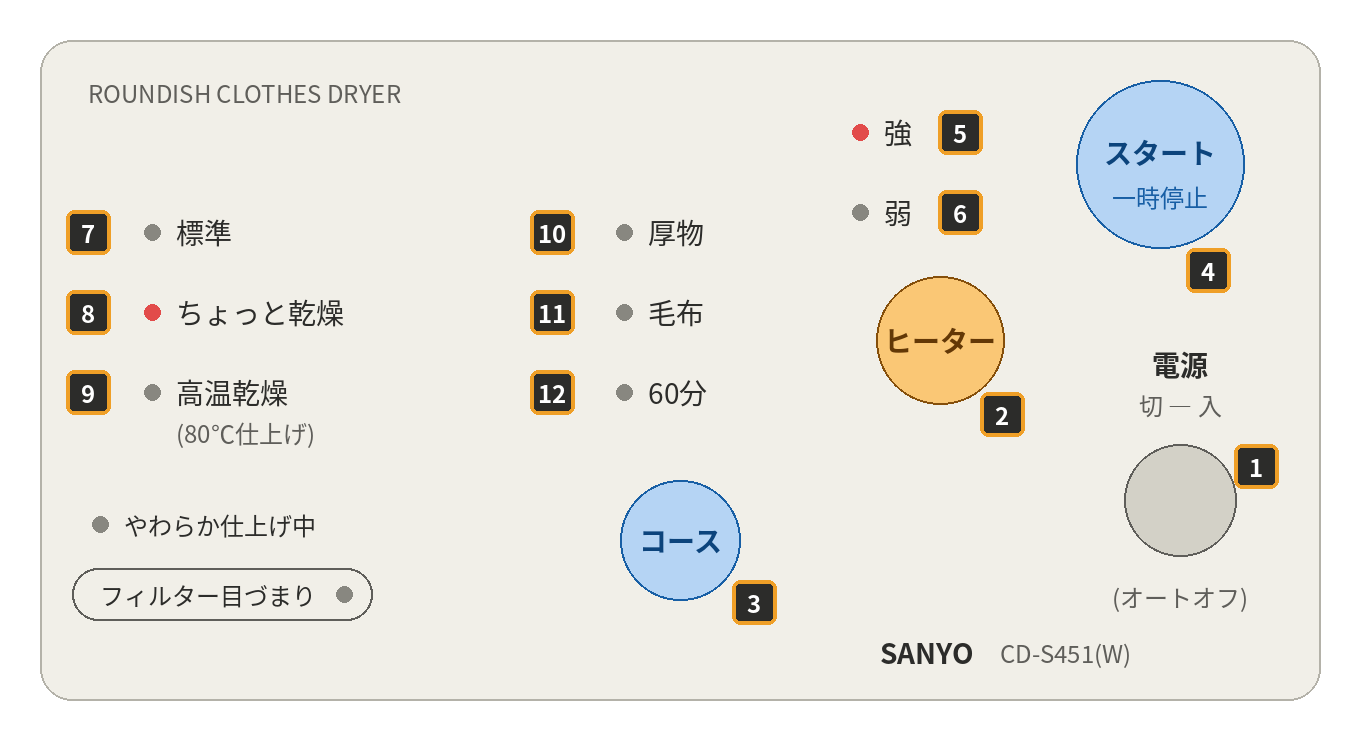
1. Load your clothes — Place your clothes in the dryer and close the door.
2. Turn on — Press (1) to turn the dryer on. Once on, red lights will appear on the display.
3. Select drying mode — By default, the dryer starts on high heat tumble dry. Press (4) to select this mode.
4. Adjust heat — Press (2) to adjust the heat level, from High (5) to Low (6).
Please note:
If you select a setting other than 9 or 12, you'll need to periodically check the dryer's contents during the drying process.
Here is what each number means in English:
- 電源 切/入 (オートオフ): Power on/off button, with auto-off
- ヒーター: Heater button. It switches the heat level between strong and weak.
- コース: Course button. It cycles through the drying programs.
- スタート / 一時停止: Start / pause
- 強: Heater strong
- 弱: Heater weak
- 標準: Standard drying
- ちょっと乾燥: Light drying (slightly dry)
- 高温乾燥 (80℃仕上げ): High-temperature drying, finishing at 80 °C
- 厚物: Thick items (heavy fabrics)
- 毛布: Blanket
- 60分: 60-minute timed drying