appliances
Speaker
DENON AVR X550BT
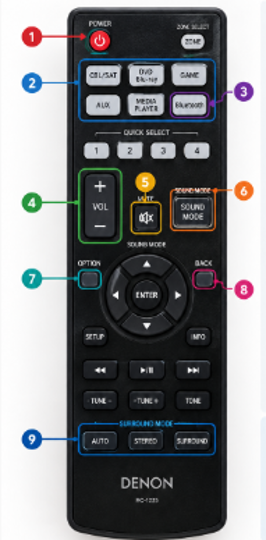
- POWER; Turns on the DENON receiver ON/OFF
- INPUT SOURCE Buttons; Select the device you wish to listen via
- CBL/SAT - TV/Cable/Satellite
- DVD/BLU-RAY Player
- GAME – Gaming Consoles such as Xbox/PS
- AUX – Wired connected
- devices
- MEDIA PLAYER – USB or
- External Media Players
- BLUETOOTH – Play music
- from your device!
- BLUETOOTH; Use this to pair and
- connect via Bluetooth connection
- VOLUME – Increase or Decrease
- MUTE – Temporarily turns all
- sounds off. Press again to restore
- the sound
- SOUND MODE; Changes the
- Audio mode. SELECT BUTTONS 8
- to then select the style of surround sound
- OPTION; Opens additional options and settings
- BACK; Returns to previous menus
- SURROUND SOUND – Refer to step 6.