
appliances
Dish Washer
Panasonic- NP-P60V1WSAA
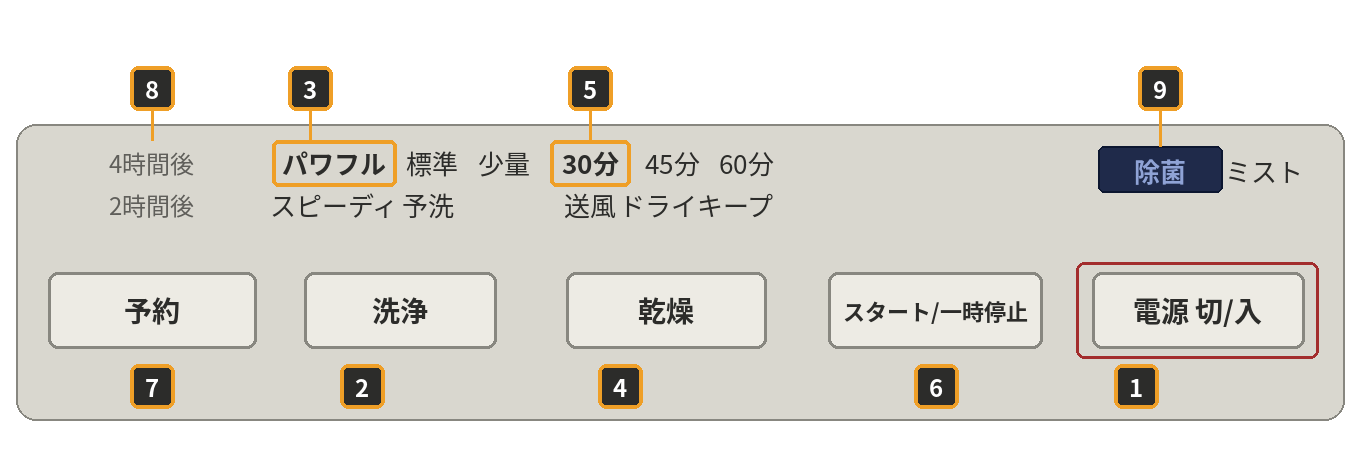
Please rinse off any food debris from plates and cutlery before loading — this helps prevent clogging and ensures a thorough wash.
1. Turn on — Press (1) to turn the dishwasher on. Slide the lever to the left to open it — this is a drawer-style unit that slides out from the counter.
2. Load your dishes — Place your dishes and cutlery into their respective spots. Please avoid overloading the dishwasher.
3. Choose your cycle — The dishwasher defaults to Regular mode (about 80 minutes). For larger loads, press (2) until the panel lights up at (3) to select High mode (about 120 minutes).
4. Confirm — Once you've chosen your cycle, press (4) until the panel lights up at (5).
5. Add detergent — Place detergent powder or a tablet (found next to the dishwasher or under the sink) into the receptacle at the front left of the washing compartment.
6. Close and lock — Slide the dishwasher back into the counter and move the lever to the right to lock it in place.
7. Start — Press (6) to start the cycle.
Additional details (optional)
- (7) Delayed start button: Press this if you'd like the cycle to begin later instead of straight away.
- (8) Delayed start lamps: These show when the cycle will begin, either in 2 hours (2時間後) or in 4 hours (4時間後).
- (9) Sterilizing mist lamp (除菌 ミスト): This lights up during some cycles while the detergent mist is working. It's normal, and you don't need to do anything.